Features of OciDeck
An overview of the most important options of OciDeck.
OciDeck
Get started
Use OciDeck in the browser, download it for your computer, join the Signal group or view the source code.
OciDeck combines a structured presentation editor with open storage in Marp Markdown. Below is what the app can do. Where something is not quite there yet, it says so — better that than a list promising more than the program delivers.
Documents alongside presentations
Besides presentations, OciDeck can edit a regular flowing Markdown document: a report, memo or note. The visual and source views use the same editor; documents can be converted into presentations and back again. Export is available as Markdown, HTML, PDF, LaTeX, ePub and ODT.
Privacy and secure sharing
OciDeck is made for situations in which presentations can also be documents with risk: a training with examples, an administrative briefing, a pen test report, an incident analysis or an internal dashboard. Therefore, privacy and classification are not separate from export, but in the normal workflow.
- OciWacht searches locally for potentially privacy-sensitive data, such as identification numbers, IBANs, payment cards, e-mail addresses, telephone numbers, API keys, tokens, private keys, passwords and special categories of personal data.
- The check is done on the device. You do not need to go to an external service to perform a privacy check.
- For each finding you can choose: accept, accept with warning, or omit from presentation and export.
- Editing does not happen as a cosmetic black bar over text. Data you omit will not reach the receiving render or export layer.
- The source presentation can remain complete for the owner, while an edited version can be safely shared more widely.
- Privacy findings are placed next to other quality controls, so that they do not only become visible at the end of the process.
[ ](/images/ocideck/ociwacht-privacy.png)
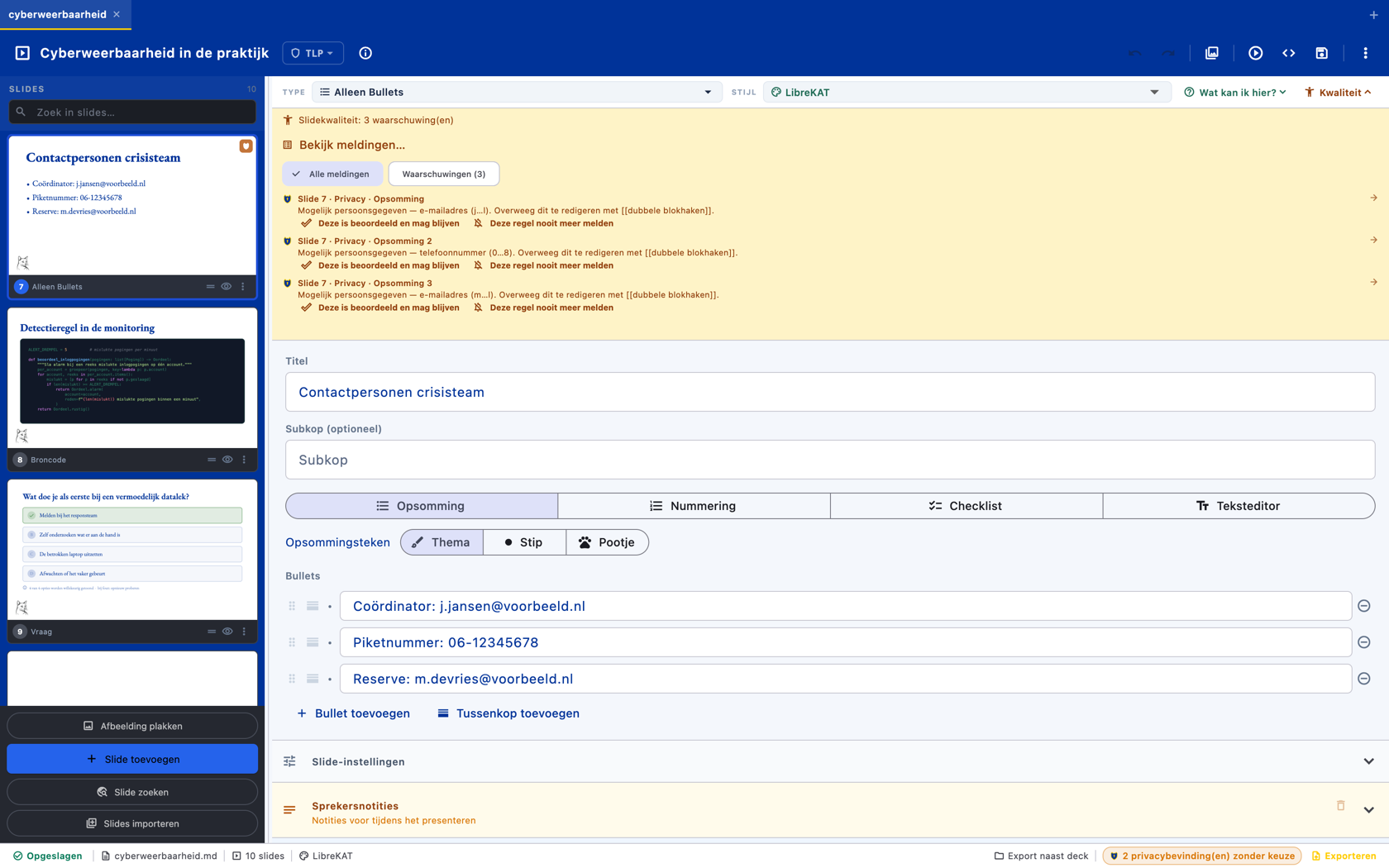
OciAwaiting a contact slide in action. The yellow quality panel at the top reports three privacy findings: two email addresses and a phone number, found in the bullets below. Note how each found value is shown truncated — “(j…l)”, “(0…8)” — the full data does not appear again anywhere, not even in the message itself. For each finding you choose: assessed and left in place, or never reported again. The entire control runs on your own device; nothing goes to an external service.
Read more about why the privacy features are special.
Graphs and data
OciDeck has fourteen chart types: bar charts (vertical, horizontal, stacked and horizontally stacked), combo charts, line and area charts, pie and donut charts, radar/spider charts, scatter plots, waterfalls, heat maps and target-versus-actual. A heat map can also be used as a probability-impact matrix for risks, for example. With the Process improvement module on, eight statistical types join them — see Process improvement below.
Data can be entered into a grid or imported from CSV. The specification is stored in the Markdown as JSON; optionally the graph can point to CSV files in a neat data/ directory. For HTML export, charts are included as standalone SVG.
[ ](/images/ocideck/slide-grafiek.png)
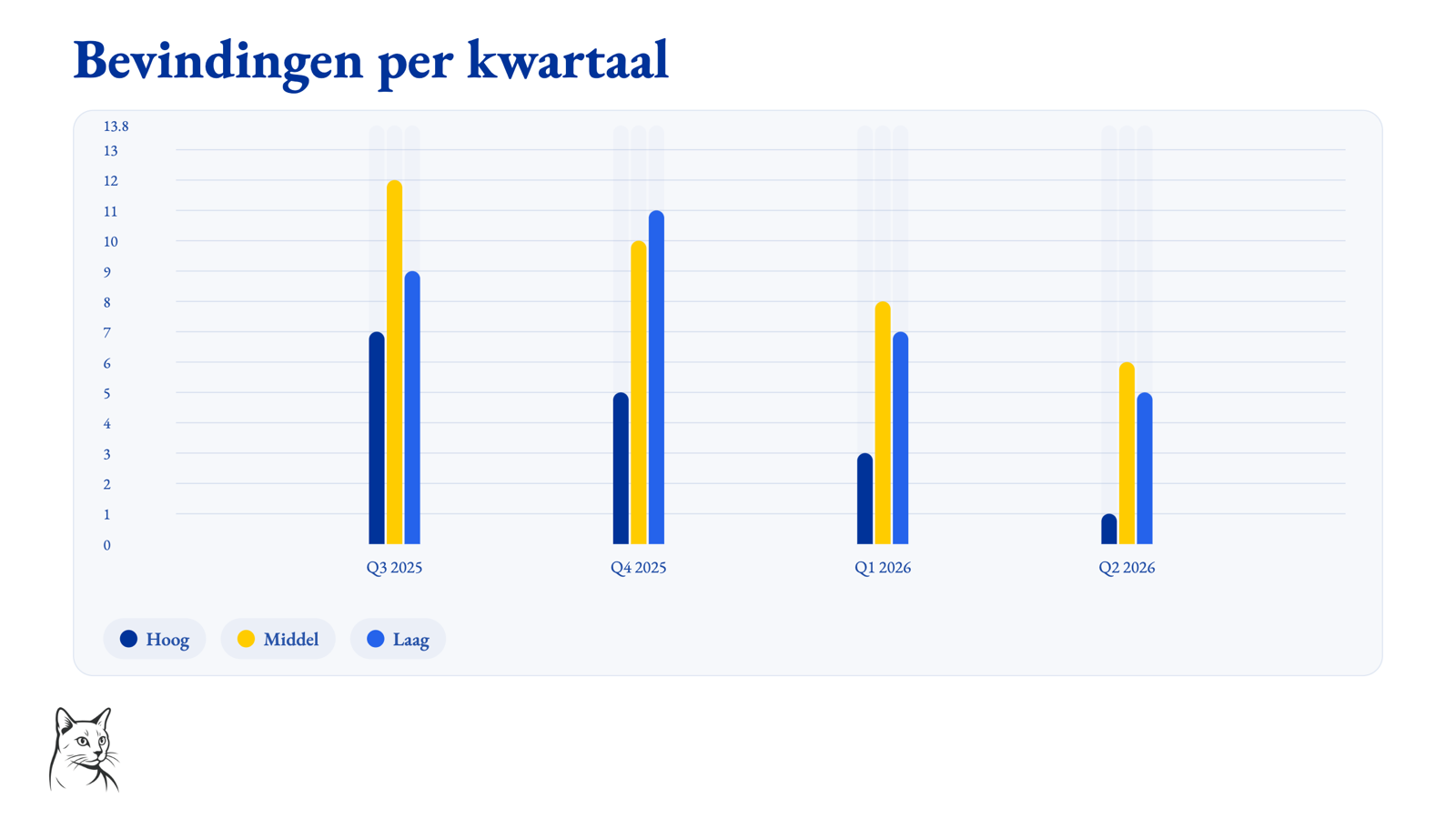
This is how a graph slide renders. Four quarters, three ranges — high, medium and low — automatically in the colors and font of the style profile, with legend and axis labels included. The Markdown of the deck only contains the data specification; OciDeck does the drawing, live in the editor, during presentation and in every export. The graph can be drawn with an animation when opening the slide.
[ ](/images/ocideck/slide-risicomatrix.png)
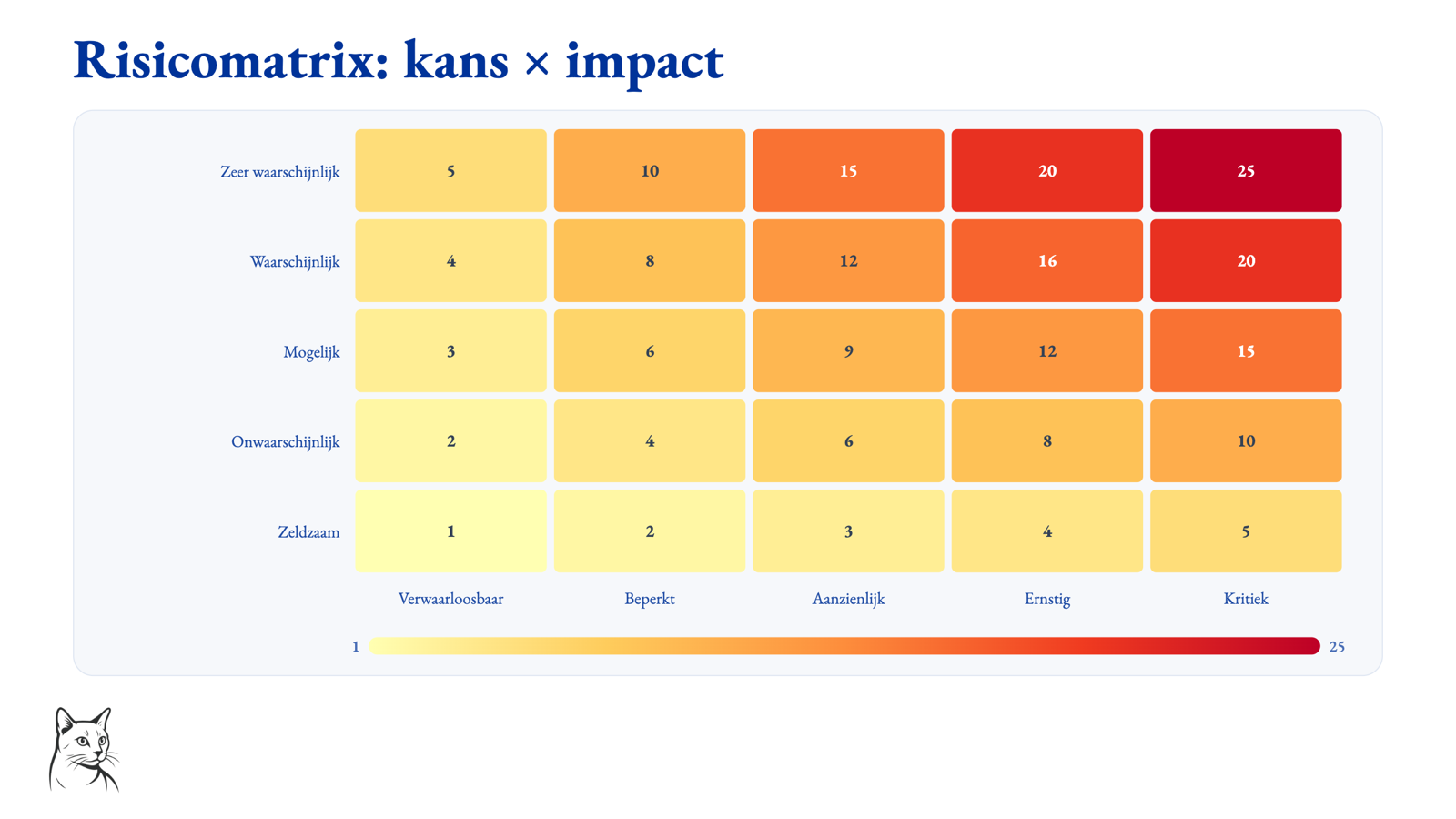
A heat map as a risk matrix. Five probability classes times five impact classes, each cell colored from light yellow to deep red according to the score, with a color scale at the bottom. This is the same graph type that is also used for regular heat maps: label the axes of chance and impact and you have a risk matrix that comes from data instead of from separate colored boxes.
[ ](/images/ocideck/slide-dashboard.png)
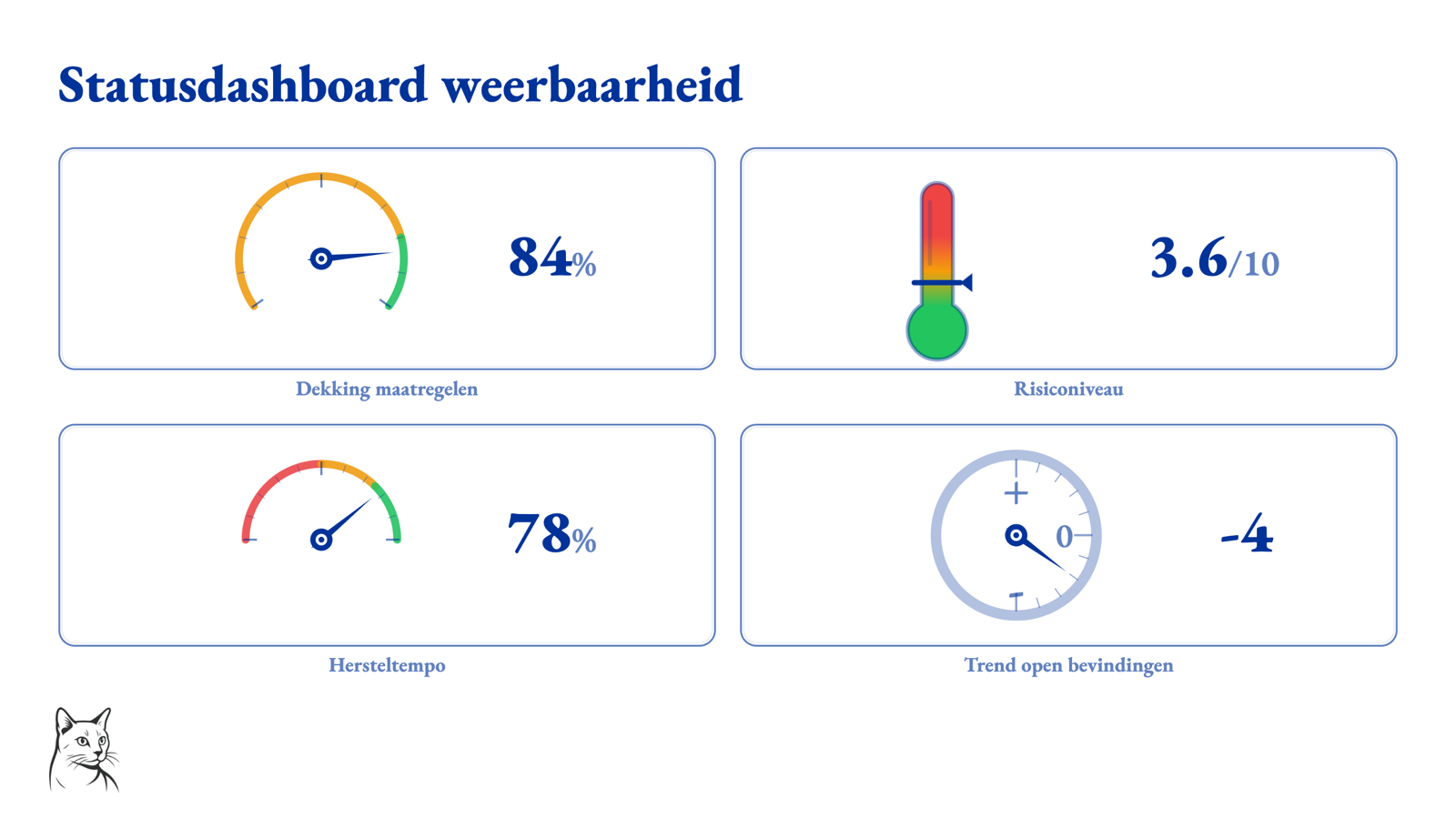
A cockpit dashboard for a status meeting. Four meters on one slide: a speedometer for the coverage of measures, a thermometer for the risk level, a voltmeter for the recovery rate and a rise/fall meter for the trend in open findings. Each meter has green and red zones, and when opening the slide the needles can move to their value.
Checklists during presentations
- Checklist slides can be checked off while presenting, so that progress remains visible without leaving the presentation.
- This can be used for training, workshops, demonstrations, security reviews and MIAUW reports in which steps, checks or findings are completed live.
- The audience view remains synchronized with the presenter, so that checked items become part of the presentation itself.
Share at the right level
Not every slide is intended for every audience. OciDeck therefore helps to determine per presentation and per slide how widely information may be shared. Under the hood, this is possible with TLP classification: an internationally used color system for confidentiality. In practice, this mainly means that OciDeck can help prevent an internal slide from accidentally ending up in a broader export or presentation.
- A deck can be given a general share or confidentiality level.
- Slides can be given their own level if they are more sensitive than the rest of the presentation.
- Slides that are more sensitive than the chosen presentation level can be automatically omitted during presentation and export.
- Visual marking can follow the FIRST TLP 2.0 colors, without the user having to know the abbreviation first.
- Export can be fail-closed if classification rules are incorrect.
- Export metadata can take classification information to PDF, PPTX and HTML.
[ ](/images/ocideck/slide-tlp.png)
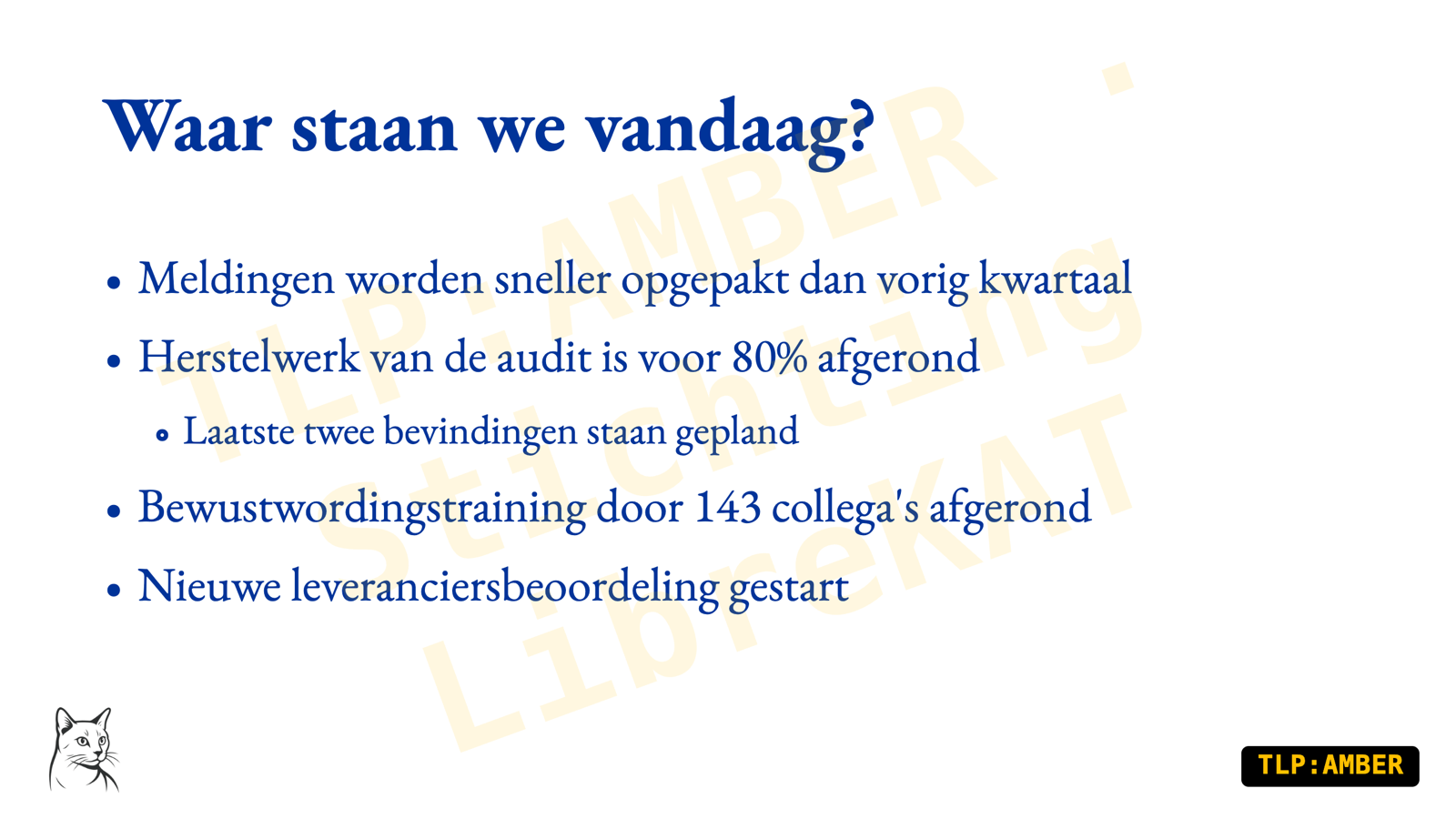
A slide classified as TLP:AMBER. At the bottom right is the TLP label in the official FIRST colors, and diagonally across the content is a watermark with the classification and organization name. Both are rendered by the app — nothing is hand-pasted on — and travel to presentation, PDF, PPTX and HTML. If you present or export to a wider audience than the classification allows, this slide will automatically be left behind.
Read more about sharing at the right level and TLP classification.
Slide shapes and content
- Structured editors per slide type: title, bullets, two columns, bullets with image, single, double or full-page images, quotes, tables, sections, video, audio, source code, charts, cockpit dashboards, interactive questions, timelines, scorecards and free Markdown.
- Scorecard slides put a handful of headline figures next to the figure from the previous report, so the movement is visible and not just the current state.
- Choice-menu slides: blocks that each jump to another slide in the same presentation, as a grid, a list or a ring. Useful when a training course or a reference deck should not have to be walked through from front to back.
- When you pick a slide type, the explanation of whatever the mouse or the keyboard is pointing at stands below the grid — you choose on a sentence, not on an icon. The type of an existing slide can be changed later.
- Video slides can show local video, video URLs and links to YouTube or Vimeo. YouTube and Vimeo links play through the official embedded player; online media is off by default and must be enabled deliberately.
- Source code slides with syntax highlighting per programming language. The code is stored as a fenced code block and scales with the slide plane.
- Free Markdown slides with syntax highlighting, LaTeX math and Mermaid diagrams.
- Timeline slides that convert events from a regular Markdown list into an animated timeline.
- Image callouts with numbered markers, regions and arrows, including step-by-step reveals during presenting and export support.
[ ](/images/ocideck/slide-tijdlijn.png)
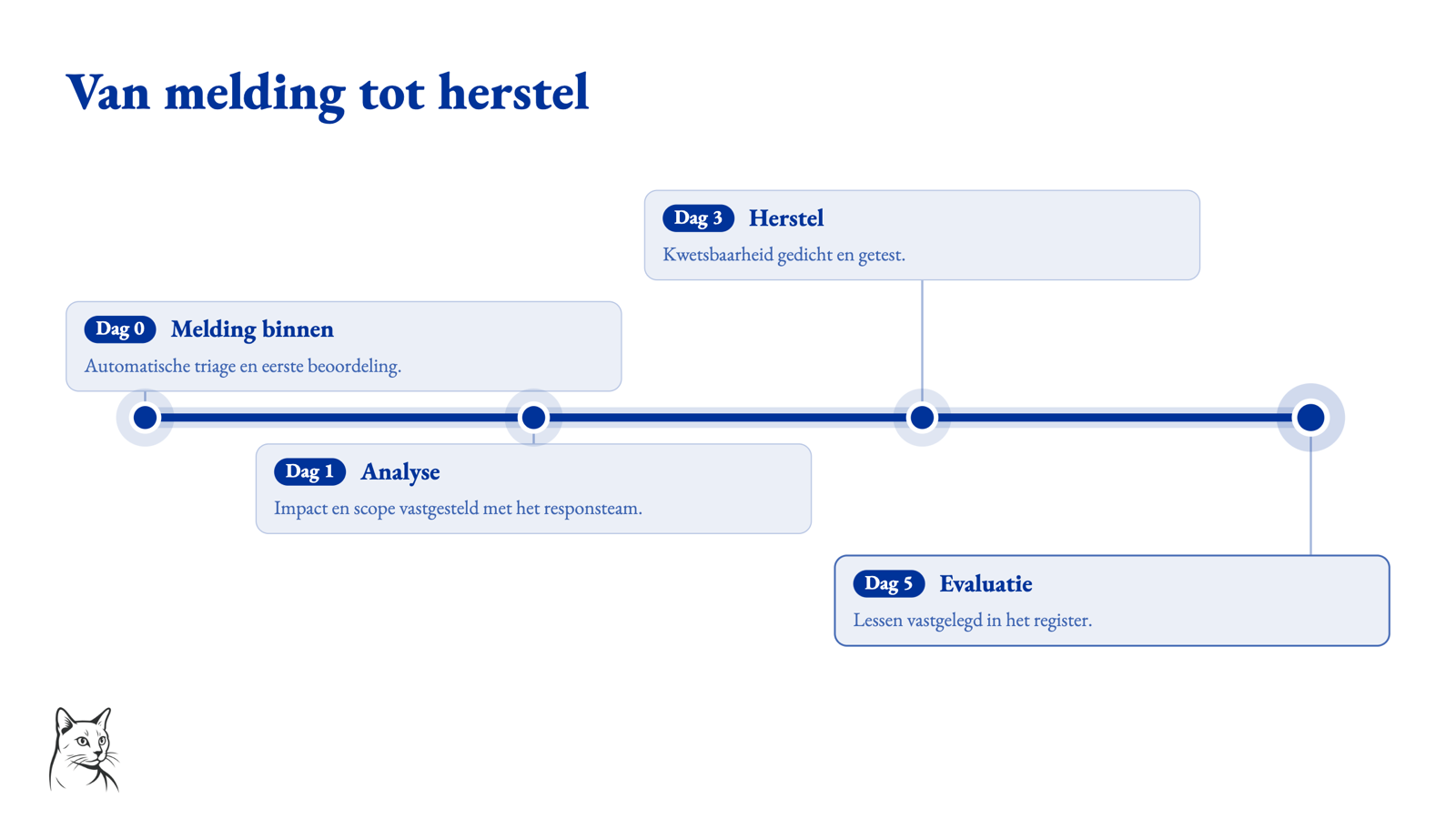
A timeline slide, from notification to evaluation. In the Markdown this is nothing more than a regular list with four lines — “Day 0 :: Notification within :: …”. OciDeck converts this into a timeline with nodes, cards above and below the line and a short explanation for each event. During the presentation, the line can be drawn step by step.
[ ](/images/ocideck/slide-code.png)
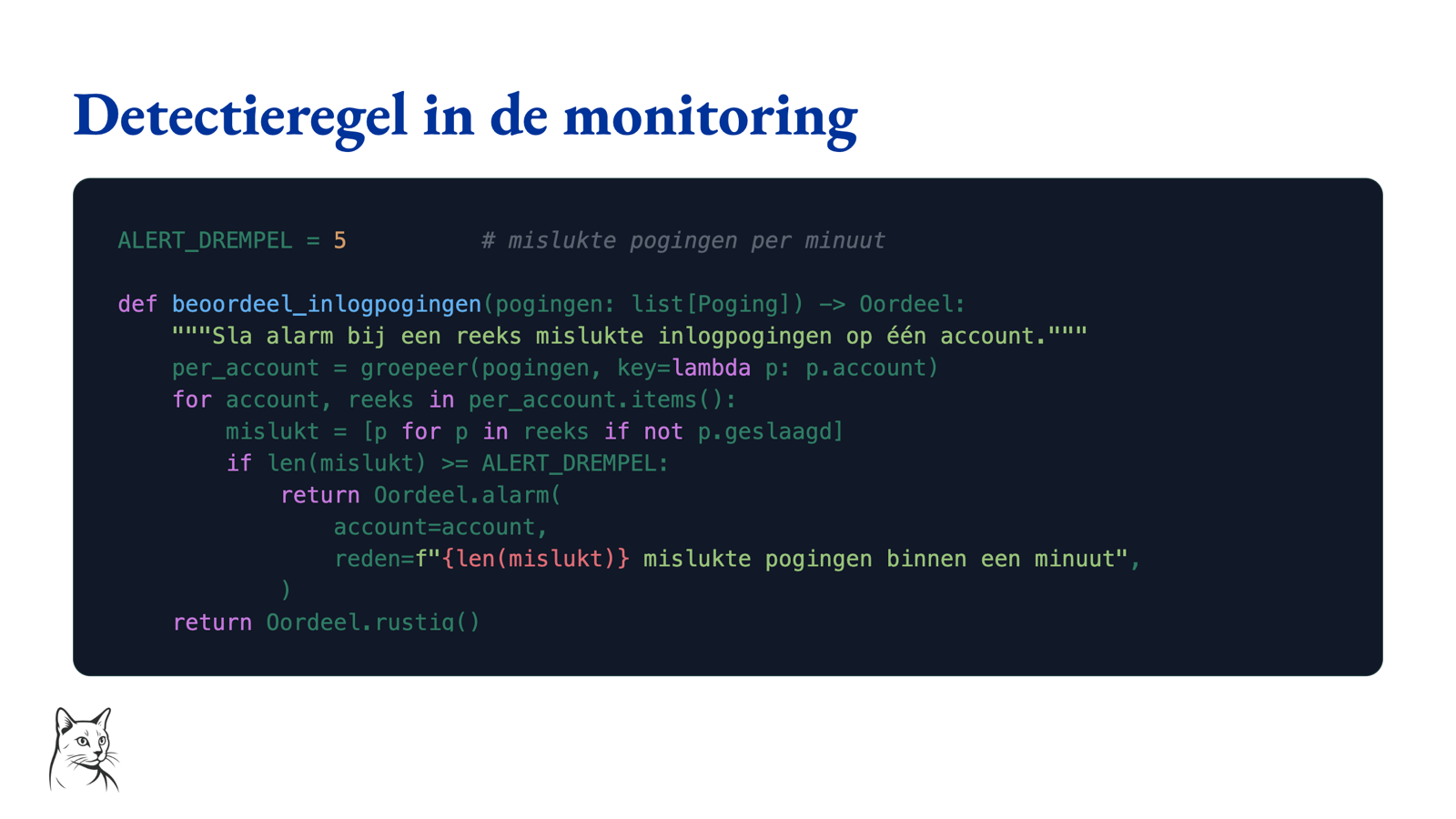
A code slide with real source code. The code is listed as a fenced code block in the Markdown and is shown on the slide with syntax highlighting on a dark code area — here a Python detection line. So no screenshot from an editor: the code remains text, searchable and editable, and scales with the slide area.
Read more about what Marp Markdown makes possible.
Presenting
- Live preview while editing.
- Present full screen with keyboard navigation, blank screen, auto-advance and slide overview.
- Presenter view with current slide, next slide, notes and timer.
- Rehearsal mode with countdown, time per slide and a summary afterwards.
- Dual-screen presenter: the projector shows the slide, the laptop the presenter view.
- Annotation layer with pen, highlighter, eraser and laser pointer. Annotations remain separate from the Marp Markdown and can be saved as a sidecar.
[ ](/images/ocideck/presentatie.png)
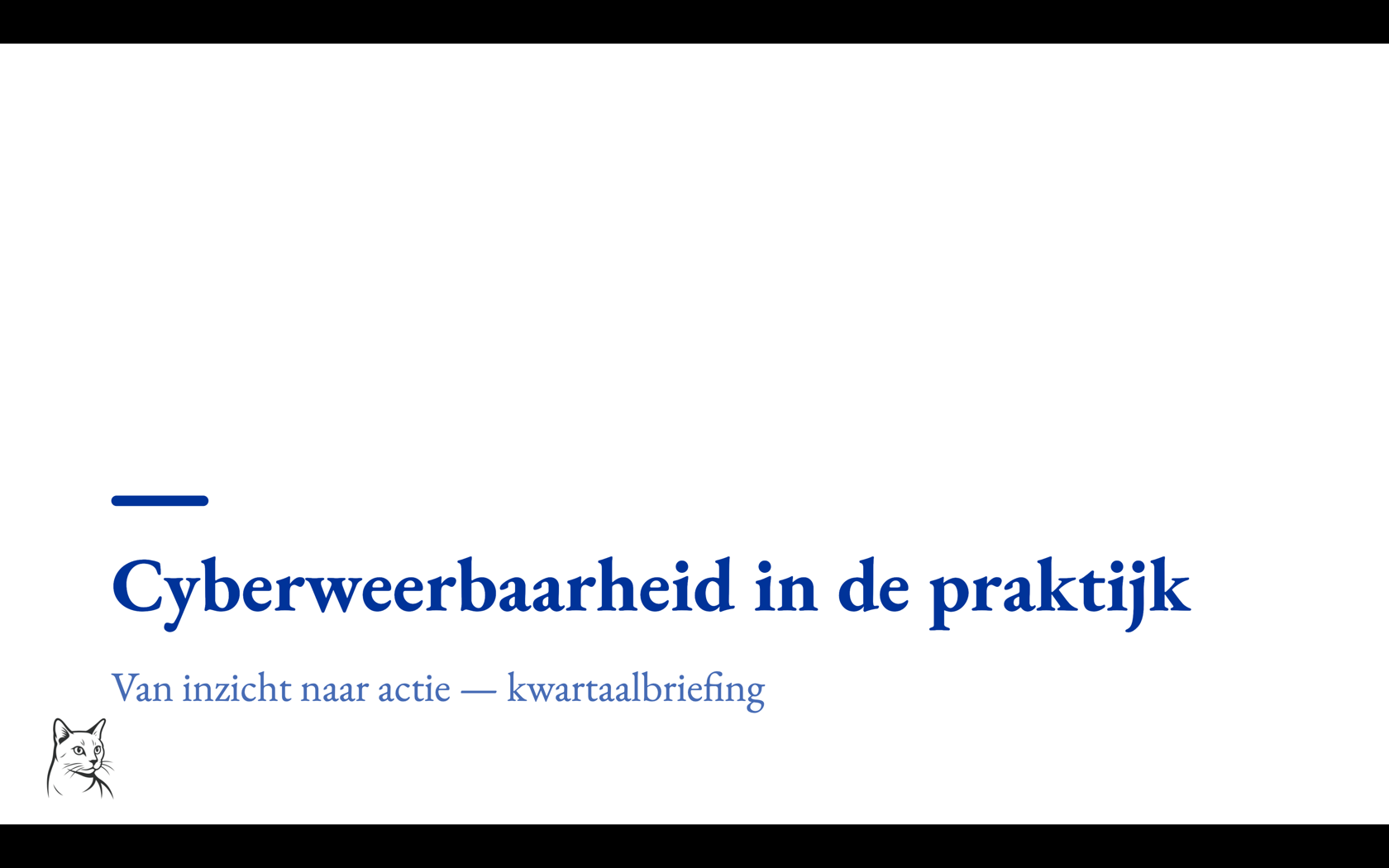
The presentation mode, as the audience sees it. The title slide fills the screen, in the style profile of the deck — here with the LibreKAT logo at the bottom left. Navigation is done with the keyboard, and with one key you can switch to a black screen, the slide overview or the presenter view. If you connect a projector, this view goes to the large screen and you keep the presenter view.
Interaction
- Quiz slides in six kinds that can be answered while presenting: multiple choice, true/false, multiple correct answers, ordering questions, image pairs and open text.
- The eLearning module adds three more kinds to author with — matching, fill-in and pointing at a spot in an image. Those three are stored in the file; answering them while presenting is not possible yet.
- A presentation can continue blocking until a question is answered correctly.
- Live editable tables while presenting, disabled unless you deliberately enable it.
- Checklists can be completed while presenting.
- The audience view remains in sync with the presenter.
[ ](/images/ocideck/slide-quiz.png)
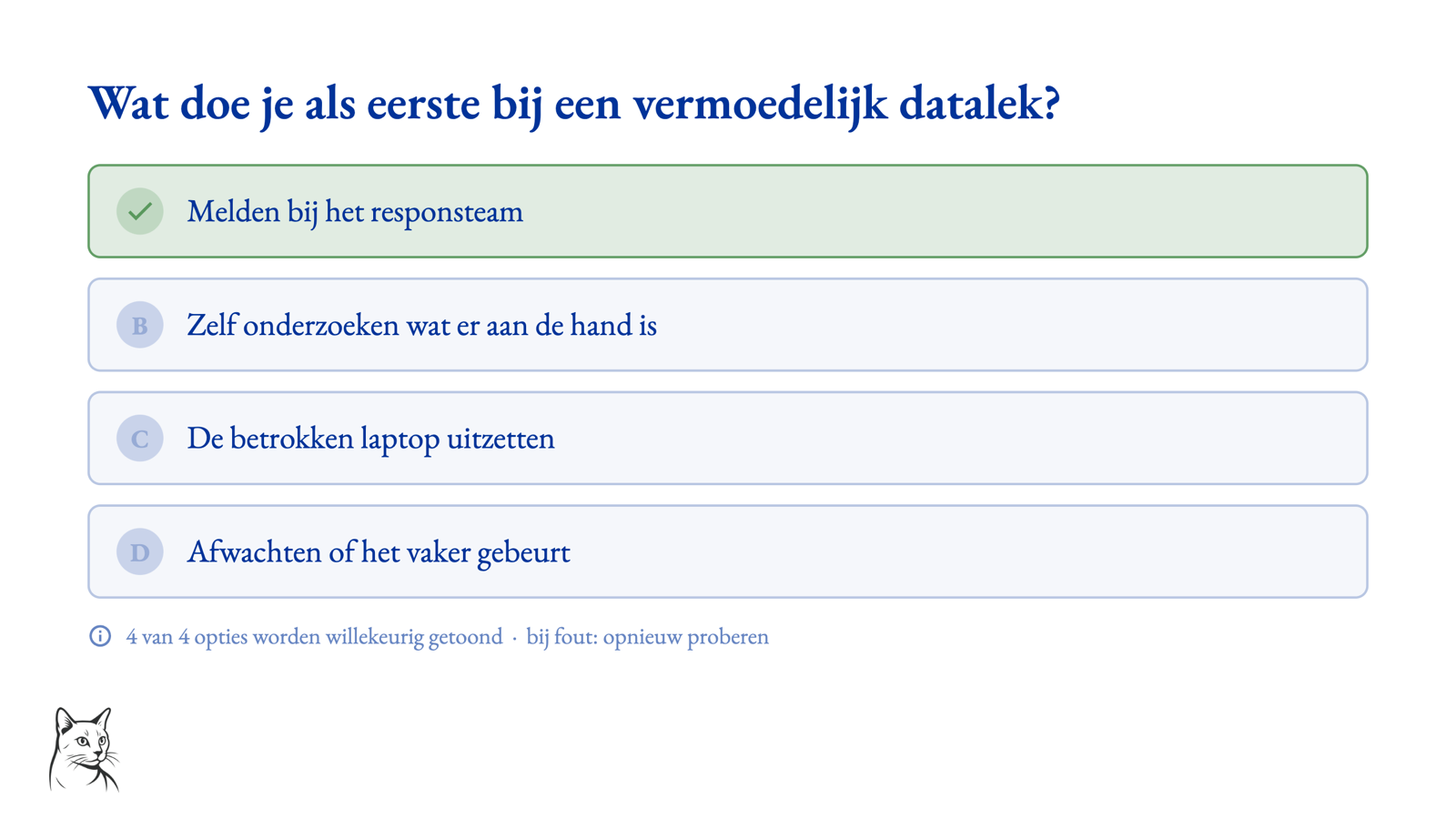
A quiz slide after answering. The question is at the top, the four options below; the correct answer is highlighted in green. At the bottom, the slide lists the rules that you set per question: show options in random order, and try again if you get an incorrect answer. A presentation can even refuse to continue until the question is answered correctly — useful in training and testing.
Modules you switch on yourself
OciDeck has eleven optional modules. They are all off until you switch them on under Settings → Extensions, so someone who simply makes presentations never meets them. Switching one off never strands existing work: a presentation that already carries such a slide still opens and renders — the file is the source, not the switch.
Information security reporting (MIAUW)
Intended for reports following the Methodology for Information Security Research with Audit Value.
The module adds, among other things:
- finding slides, findings summary, checklist, scope matrix and sign-off slides;
- a CVSS 4.0 builder with offline CWE selector and CVE fields;
- a finding wizard;
- compliance overview against the MIAUW requirements;
- automatic numbering of findings;
- SHA1 and SHA-256 hashing of evidence;
- scope coverage checks;
- a derived management summary;
- finalizing and sealing reports;
- optional RFC 3161 trusted timestamp;
- export to MIAUW report template;
- an AES-256 encrypted audit file with report, evidence and hash tables.
Everything works offline by default.
Process improvement
For anyone working with methods such as DMAIC, DMADV, Kaizen, A3, 8D, SIPOC, FMEA and RACI. The module adds three things.
- Eight statistical chart types beside the ordinary ones: a control chart (with the centre line and control limits drawn from the measurements themselves, and points that break a rule marked in red), a histogram with specification limits, Cpk and a normality verdict beside it, a Pareto with its cumulative line and the categories that together reach 80%, a run chart, a box plot, a probability plot, and the two design-of-experiments charts main effects and interaction.
- Read-only calculators: Gage R&R, hypothesis test (t-test, Welch, one-way ANOVA) and linear regression. They compute on your own device; no measurement data leaves it.
- Four slide shapes: matrix (SIPOC, FMEA, RACI), canvas (A3, project charter, impact/effort, SWOT, board), tree (5× Why, CTQ tree, Ishikawa) and flow (process map, swimlane, VSM).
Not one computed number ends up in your file. Control limits, Cpk, Pareto ranks, box hinges and an FMEA’s RPN are derived afresh from the data every time — change a measurement and everything moves with it. What is saved is only what you decided. And when there is too little data to compute honestly, the slide says so instead of drawing something anyway: a control chart from three measurements looks exactly as authoritative as one from a hundred.
Management system: progress against ISO standards
Report the progress of your own management system against ISO/IEC 27001 (information security), ISO 9001 (quality) or ISO/IEC 42001 (AI). Aimed at the periodic report to the board, management or a certification body: which controls are implemented, which are still planned, who owns them and what the evidence is.
- Control-status slides carrying, per control, a status, an optional maturity level, an owner, a target date or period, an evidence reference and a note.
- You load the controls from the bundled index rather than typing 93 numbers by hand; existing rows are left untouched.
- From those slides OciDeck generates a progress overview and a burn-up per section, and a template for the management review (clause 9.3) with the current figures already filled in. Both are derived from the detail slides, so no second figure can drift away from the first.
- Controls you set to not applicable drop out of the denominator — excluding one therefore never flatters the percentage.
Only the index of the standards is in the app: the numbers with their short titles. The normative text itself is copyrighted and is deliberately not included. Everything happens offline. OciDeck reports progress; it makes no certification or conformance claim and is no substitute for an auditor.
Course material (eLearning)
Slide types for course material — a learning objective, a module heading, a feedback slide and a summary of a test — in the same Markdown file as the rest of your material, with no separate authoring tool. Plus three question kinds to author with: matching, fill-in and pointing at a spot in an image.
This module is young, and it is fairer to say so here than to let you discover it: OciDeck records course content and test rules, but it does not score answers yet, does not count attempts, and does not yet show a learner the feedback you typed. What is there, though, is there properly: the slide types come back after saving and reopening exactly as you wrote them, in other Marp tools too.
The file format deliberately stores no learner results: not who answered what, no attempts, no personal progress. No keys are reserved for them either — if a results layer is ever built, it gets a file of its own.
Playing courses that come from an eLearning server is a different thing; that is further down under Following a course in OciDeck.
Image rights
Locally flags which images in your library may need a copyright or licence review, and stores the administrator’s decision beside the shared image. It is an indication, never a legal conclusion.
AI assistance
Optional, off by default, and with the choice between a local model and an endpoint you consent to yourself. The AI helps with draft text for findings and with alt text for images. What the AI wrote is marked and blocks the sealing of a report until a human has reviewed it.
Connections to other systems
- OpenKAT — turns reports from OpenKAT into a presentation, from a folder of exports or straight from one or more servers. The folder is only read; nothing in it is changed.
- LibrePlan — fetches a snapshot of a project from LibrePlan and turns it into slides. The connector only reads; it never writes back.
- eLearning server — see below.
Following a course in OciDeck
If your organisation runs an eLearning server, OciDeck can also be the learner’s side. You sign in through the system browser, after which My courses appears: your courses with their lesson count, progress and status. A lesson starts, or resumes at the last stable point; skipped slides do not count as a position. Course packages can only be played in OciDeck — editing and saving are not available.
What is recorded about you can be inspected in the app itself:
- My progress shows completed courses and lessons, the total time slides were on screen and your most recent activity, with the percentage and lesson status per course.
- My data retrieves from the selected organisation what it has registered about you, in plain language, searchable, with the terms explained. The search runs locally over the retrieved copy; the search text does not go to the server. The Access and changes category shows when your learner record was viewed or changed, and for what purpose.
When you leave or finish a lesson, OciDeck sends one snapshot: the last slide, whether the lesson is complete, and how long each slide was on screen. No answers, scores, notes or course content travel with it. “On screen” is wall-clock time — not proof of attention or of having learned something, and we name it that way for a reason. If the server is briefly unreachable, the snapshots wait encrypted on your device until the next connection.
The connection is off by default, and the browser version does not offer it: it cannot store the login safely.
Working on one presentation together
Two or more people can work on the same presentation at once, through a shared WebDAV location. The editing travels through a small working area beside the presentation rather than through the .md file itself, so the saved file is left untouched while a session runs. Whoever started the session saves; the others see their work in the session until that happens. If the starter drops out, one of the participants stands in and the work carries on.
Who you are working with can be verified. In a realtime session OciDeck shows a fingerprint of each device’s identity key. Compare it with your colleague over a channel you trust and mark the device as verified; that is remembered. If a device you verified before turns up later with a different identity, OciDeck reports it as a mismatch — precisely the signal you want to see. Move to another device and you take your identity with you using a recovery key.
Import, export and storage
- Presentations are saved as standard Marp Markdown.
- Import existing presentations from PowerPoint (
.pptx), LibreOffice Impress (.odp) and Apple Keynote (.key) — as real, editable slides in Markdown, not a stack of pictures of somebody else’s slides. Dragging them onto the window works too, and the format is recognised by what is inside the file rather than by its extension. - Export to PDF, PPTX with speaker notes, ODP, LaTeX/Beamer and standalone offline HTML; documents can also be exported to ePub, ODT and Word (
.docx), with Mermaid diagrams embedded as high-quality images. - Decks can be stored as a self-contained package of assets.
- Storage of your choosing: a plain project folder, a portable
.ocideckpackage, Nextcloud/WebDAV, an S3 bucket (AWS S3, or MinIO, Ceph, Wasabi, Scaleway and Hetzner) or a git repository, where every saved version stays retrievable. - App passwords, tokens and keys are stored encrypted in the OS keychain, not in the settings file.
[ ](/images/ocideck/exportdialoog.png)
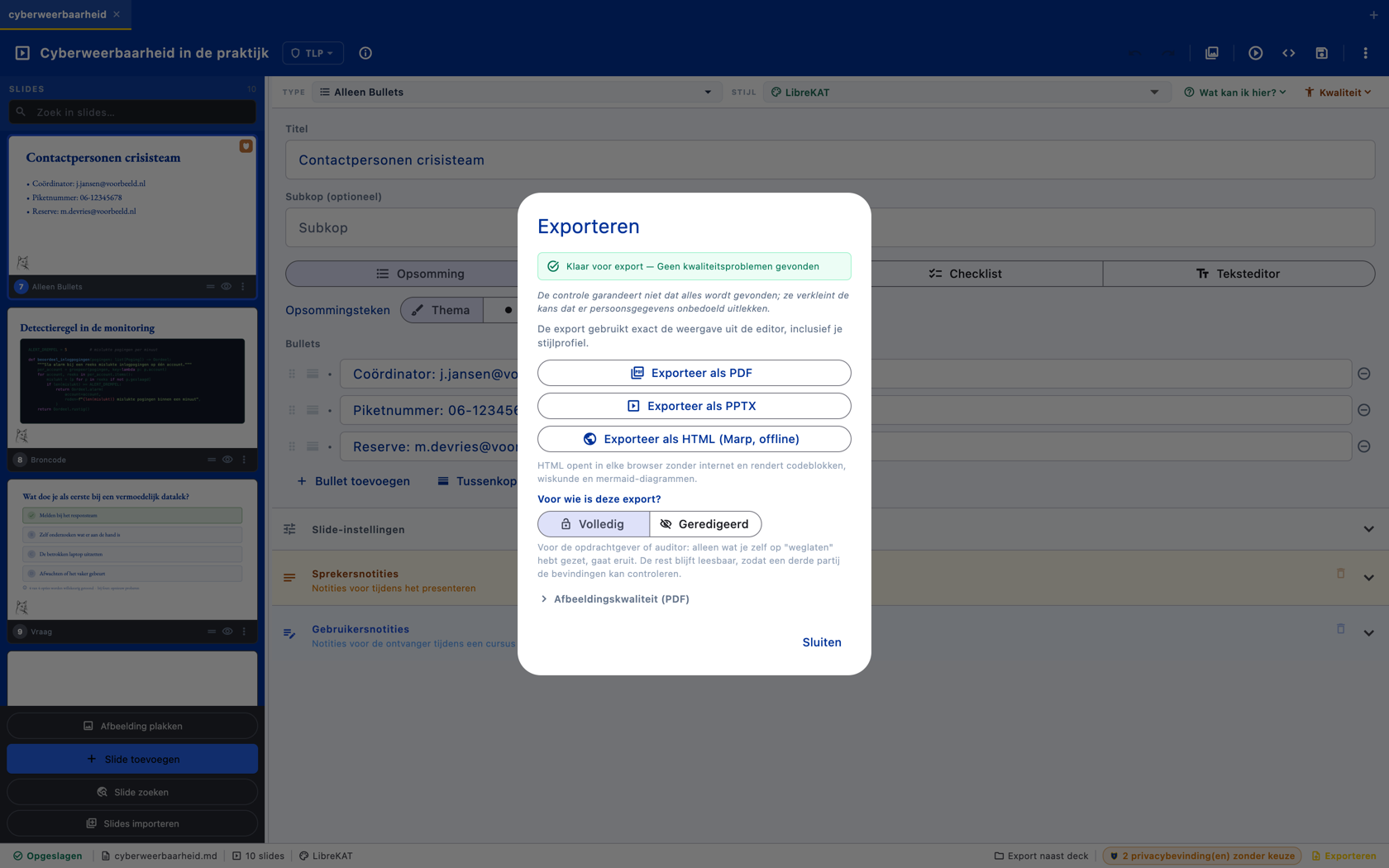
The export dialogue. At the top the green confirmation that quality control has nothing left open - if that were the case, the export can be blocked. Below are the three output formats: PDF, PPTX with speaker notes and a standalone offline HTML version. And at the bottom, the question that other presentation tools don’t ask: who is this export for? “Complete” for the client or auditor, “Redacted” for a broader audience — what you marked as “omit” simply does not appear in that version.
Productivity and accessibility
- Command palette (
Ctrl/Cmd + K) for the actions you would otherwise hunt for in a menu. - Search and replace.
- An image library across all your folders, with search, a caption and a description per image, and a management mode for clearing out duplicates without having to open a presentation first.
- Slide finder.
- Undo/redo.
- Skip slides.
- Multi-select with bulk copy, delete or skip.
- Multiple decks in tabs.
- Paste spreadsheet selections, CSV or Markdown tables into table cells.
- Markdown mode for the entire deck with find/replace and structural syntax checking.
- WCAG 2.1-oriented interface: text scale up to 200%, keyboard controls, screen reader labels and slide-change announcements.
- Automatic crash recovery.
Theming and localization
OciDeck supports style profiles for decks and source code, custom colors, fonts, logo and footer. The app itself also has appearance profiles, including a dark interface. Fonts and the Marp CSS theme are bundled, without network fetch.
The interface has been translated into 32 languages, including Dutch, English, German, French, Spanish, Portuguese, Ukrainian, Turkish, Greek, the Nordic and Baltic languages, Frisian, Latin, Papiamentu and Klingon. Tests ensure that all interface strings remain available in all languages.
[ ](/images/ocideck/donkere-interface.png)
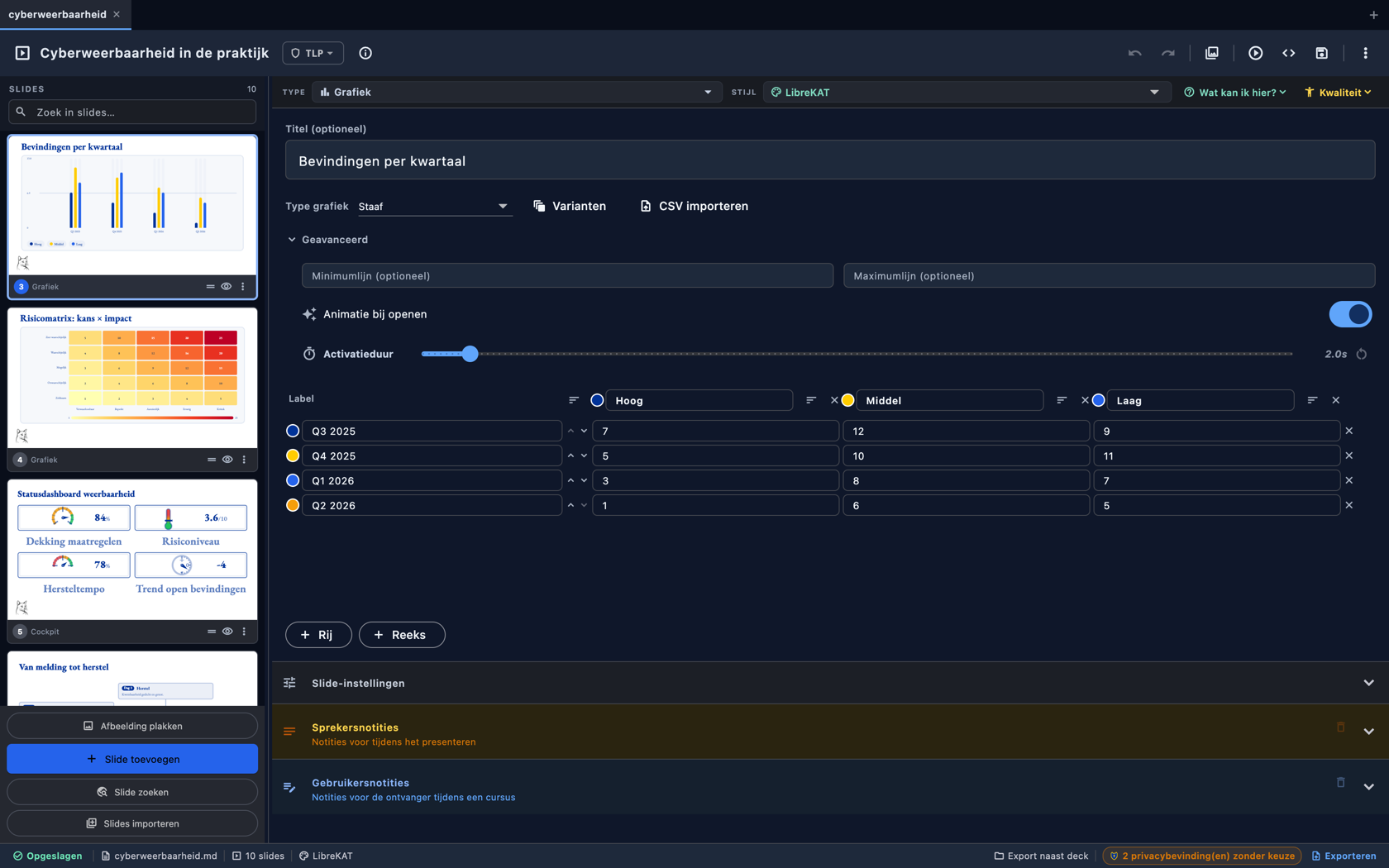
The same editor, in the dark interface profile. The entire work environment — panels, input fields, slide strip — switches to dark, while the slides themselves keep their own style profile: what you export does not change. Interface profiles come in multiple flavors and the interface has been translated into dozens of languages.
Open source
OciDeck is open source under the European Union Public License 1.2. The repository is located at: