Privacy features in OciDeck
OciDeck helps prevent sensitive data from ending up unnoticed in presentations and exports.
Read moreCreate presentations from content, data and open standards.
OciDeck
Use OciDeck in the browser, download it for your computer, join the Signal group or view the source code.
Many presentations start with a blank space. And before you know it, you’re mainly concerned with formatting: dragging a text box, choosing a font, straightening a line.
While a presentation is actually about something else — about a story, about information, about knowledge that you want to share and data that must be correct. OciDeck was built from that idea: the content is central, not the shapes.
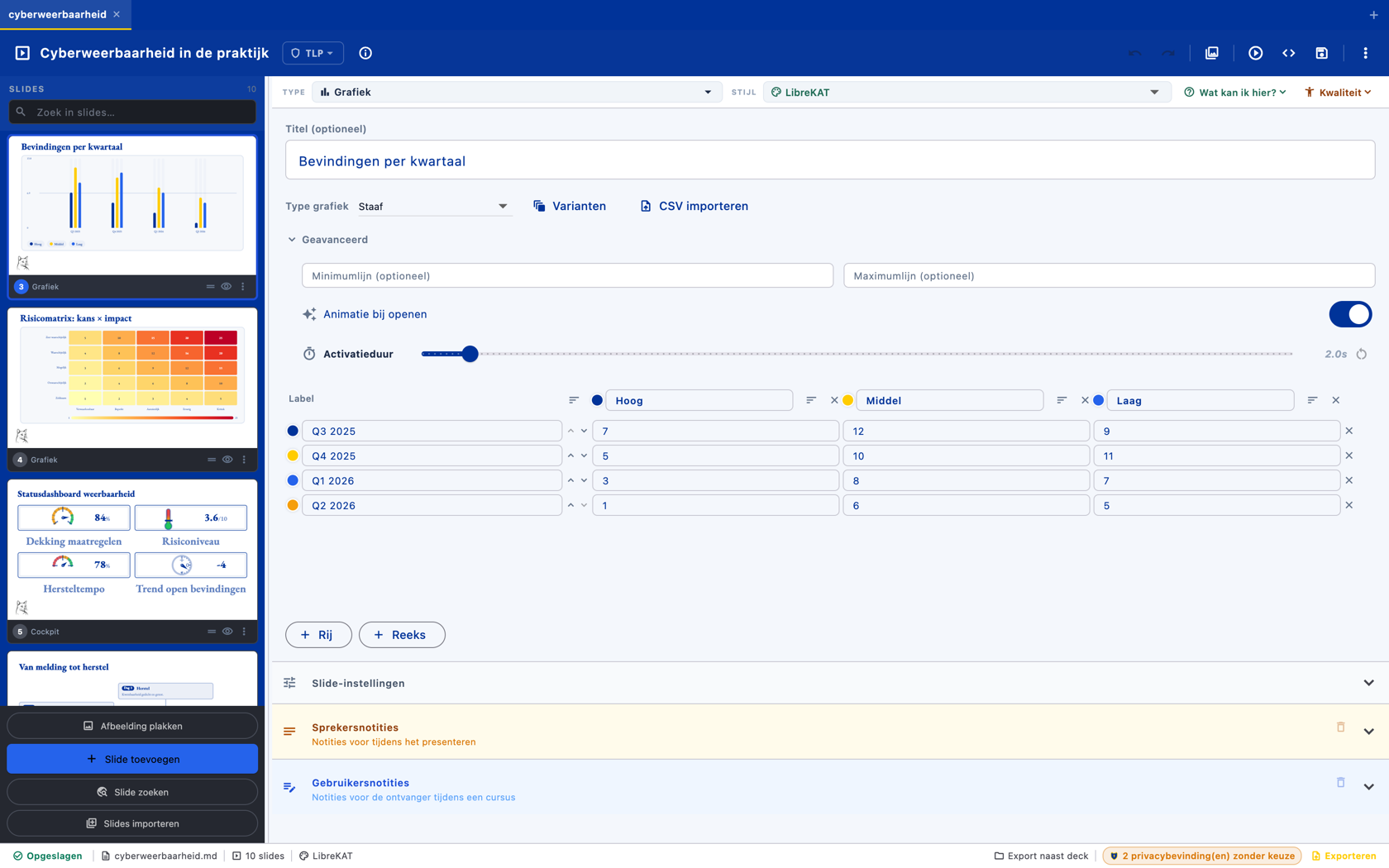
The editor, with a graph slide open. On the left is the slide strip with thumbnails of the entire presentation. In the middle there is no canvas with separate boxes, but a form to fill in: labels, series and numbers in a grid. The bar graph in the upper left thumbnail is drawn directly from those numbers — adjust a number and the slide redraws itself, right down to the export. At the top right, choose the style profile that gives the entire deck one corporate identity.
You choose what kind of slide you need — title, list, table, graph, source code, timeline, question, video or dashboard — and fill in the content. OciDeck ensures a neat, consistent display. A table is really a table, a graph comes from data, a code slide contains real source code.
This is possible because OciDeck saves presentations as regular, readable Markdown: verifiable, reusable and not locked into one program. OciDeck itself is open source under the EUPL license. Why Marp is the basis →
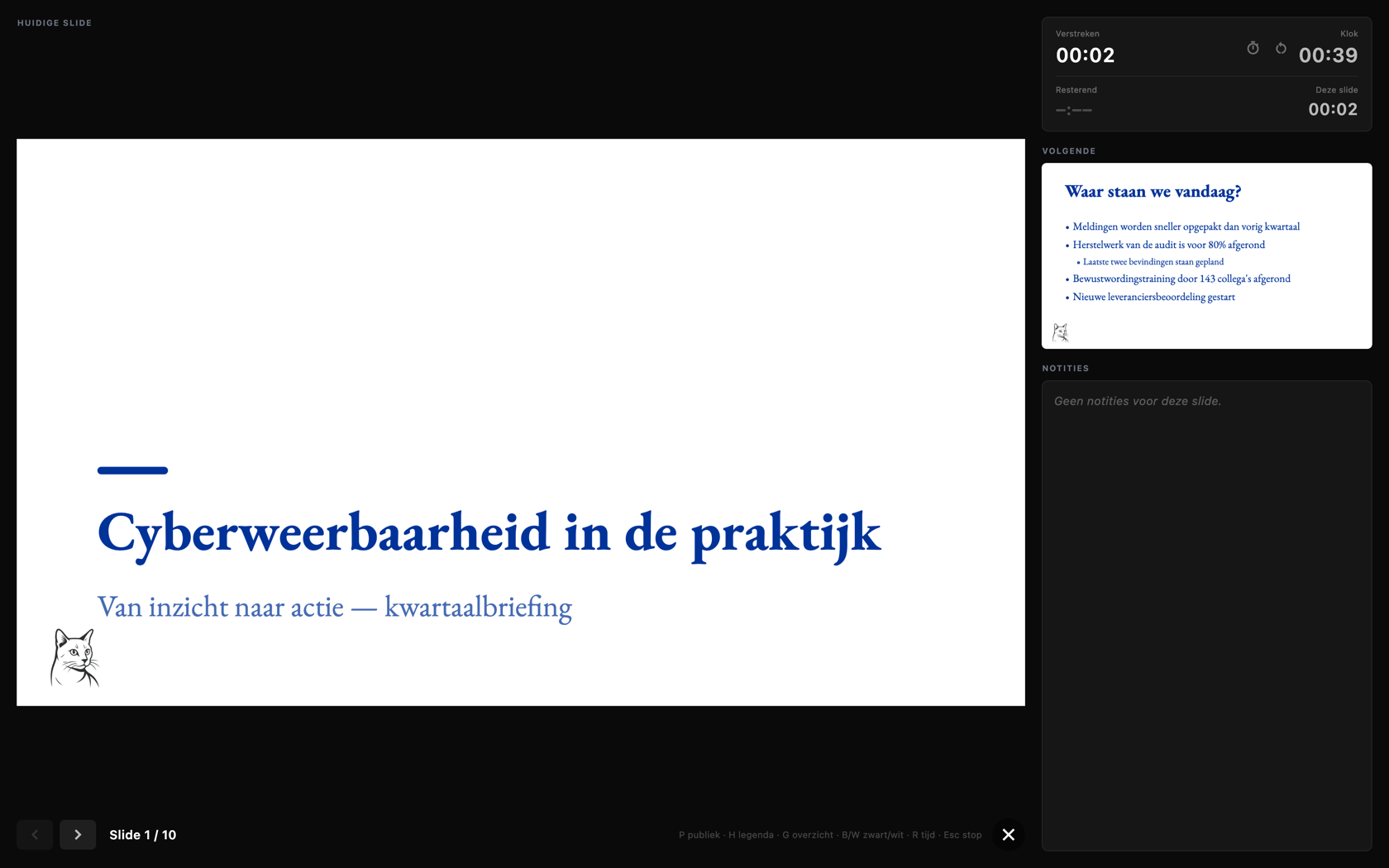
The presenter view during the presentation. Large screen: the slide that the audience now sees. Right next to it what only you see: the next slide, your speaker notes and two clocks — the elapsed time and the time on this slide. At the bottom are the shortcut keys for legend, overview and black screen. In the meantime, only the slide appears on a second screen or projector.
For trainers, researchers, security professionals, developers and organizations that want to keep control of their own information — for anyone who sees presentations as knowledge carriers, not just as formatted screens.
You still make beautiful slides. But you build them on a more solid foundation.
OciDeck
Download OciDeck for your computer, or the sample presentation to see every slide type. The macOS version is signed and notarised by Apple and opens with a normal double-click; the Windows and Linux versions are unsigned — the release notes show how to open those on each platform.
For Apple Silicon and Intel.
brew tap librekat/ocideck https://pawprint.vigilis.online/LibreKAT/homebrew-ocideck.git
brew install --cask librekat/ocideck/ocideckInstalls OciDeck with a shortcut and opens .ocideck files directly. Does not update itself.
For 64-bit Windows. Unpack and run; nothing on your computer is changed.
Portable and installation-free — works on nearly any distribution. The safest choice if you're unsure.
For Debian, Ubuntu, Linux Mint and related distributions. Download the package or use the APT source below for automatic updates.
(
set -eu
sudo install -d -m 0755 /etc/apt/keyrings
key_file="$(mktemp)"
trap 'rm -f "$key_file"' EXIT
curl -fsSL https://pawprint.vigilis.online/api/packages/LibreKAT/debian/repository.key -o "$key_file"
sudo install -m 0644 "$key_file" /etc/apt/keyrings/librekat.asc
echo "deb [arch=amd64 signed-by=/etc/apt/keyrings/librekat.asc] https://pawprint.vigilis.online/api/packages/LibreKAT/debian stable main" | sudo tee /etc/apt/sources.list.d/ocideck.list
sudo apt update && sudo apt install ocideck
)For Fedora, RHEL, openSUSE and related distributions.
Generic archive for x64 Linux (glibc 2.38 or newer). Unpack and run ./ocideck.
A demo deck showing every slide type. Open it in OciDeck on your computer or in the browser, or read it as Marp Markdown.
OciDeck helps prevent sensitive data from ending up unnoticed in presentations and exports.
Read moreMarp Markdown makes presentations reviewable, reusable and less dependent on manual layout work.
Read moreOciDeck helps decide which slides are suitable for which audience, with TLP classification as a practical aid.
Read more